See how SaaS drives faster teamwork, fewer silos, and real productivity in 2025 with AI copilots, secure cloud sharing, and automated workflows.
In December 2025, collaboration is both a superpower and a daily stress test. Teams move faster than ever, yet work can still feel scattered, noisy, and exhausting. SaaS collaboration tools are the proven way to restore clarity, speed, and confidence. They bring people, files, conversations, and workflows into one reliable cloud workspace.
This guide breaks down what SaaS changes, why it works, and how to roll it out without chaos. It also uses recent 2024 to 2025 research to keep the advice practical, current, and credible.
Why collaboration feels harder in December 2025
Work changed quickly, and the pressure did not slow down. Hybrid schedules remain normal in many industries. Distributed teams are also common. Consequently, collaboration depends on digital systems, not office proximity.
At the same time, attention is under constant attack. Microsoft WorkLab highlighted an alarming pattern in 2025: many employees are interrupted every couple of minutes during core work hours by meetings, emails, or chats. That pace makes deep focus feel almost impossible. (Microsoft)
Additionally, the amount of information inside companies is exploding. Atlassian’s 2025 research described a painful truth: teams waste a significant share of their time just searching for answers. That is not a small annoyance. It is a critical productivity leak. (Atlassian)
Meanwhile, “work about work” keeps growing. Status checks, app switching, chasing approvals, and hunting for the latest file version drains energy. Asana’s research has repeatedly warned that a huge portion of time goes to coordination overhead instead of skilled work. That reality creates frustration, burnout risk, and slow delivery. (Asana)
SaaS matters because it attacks these root causes. It reduces friction, shortens feedback loops, and replaces messy handoffs with a shared system.
SaaS in plain terms: the collaboration engine in the cloud
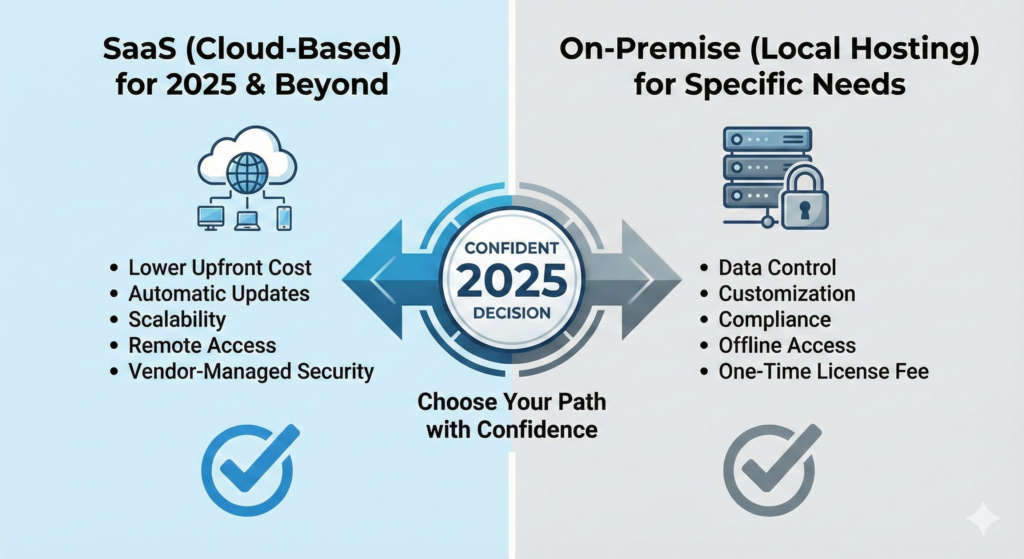
SaaS means Software as a Service. You access it through the internet. The provider hosts, updates, and secures the product. Your team logs in and works immediately.
That sounds simple, yet it is a breakthrough shift for collaboration. Instead of emailing files around, teams co-create in real time. Instead of scattered tools, workflows live in connected hubs. Instead of slow upgrades, features arrive continuously.
Furthermore, SaaS scales smoothly. A small team can start fast. A larger organization can standardize processes across departments. In a high-change environment, that flexibility is vital.
SaaS is also tied to a bigger macro trend. Global public cloud spending has been rising strongly, and forecasts for 2025 remain massive. That reflects a clear signal: organizations are still moving core work into cloud platforms because the benefits are too compelling to ignore. (Gartner)
Real-time teamwork: shared documents, chat, and meetings that actually help
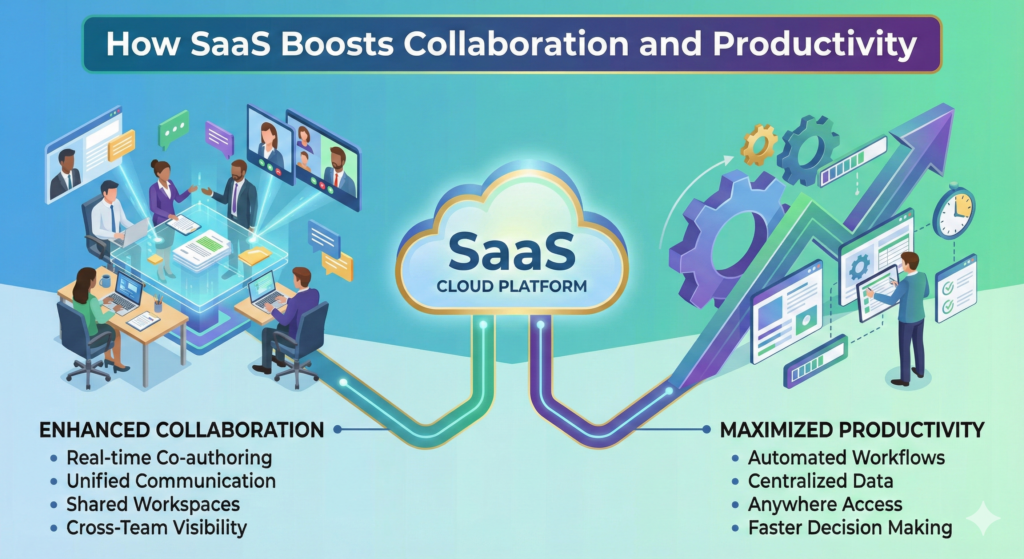
SaaS makes collaboration immediate. It does not just “connect people.” It changes how decisions happen, how work moves, and how fast teams learn.
Co-authoring that ends version chaos
Shared documents are one of the most underrated productivity wins. With cloud docs, everyone edits the same file. Comments are attached to the right paragraph. Suggestions can be tracked. Approvals are visible.
As a result, three classic problems shrink fast:
People stop asking “Which version is final?”
Teams stop losing context in long email threads.
Leaders stop waiting for someone to merge edits manually.
This is not only convenient. It is empowering. It builds trust because the work is transparent, and the history is verified.
Messaging that supports async work
Chat tools can either save time or destroy focus. SaaS helps when it is used with intention. Channels keep topics organized. Threads protect clarity. Mentions reduce noise when used carefully.
However, chat alone is not enough. The critical shift is linking chat to the work system. When a decision happens in a channel, it should be captured in a task, a document, or a knowledge base. That connection is what turns conversation into execution.
Meetings that produce action, not fatigue
Meetings are still necessary. Yet meeting overload is a serious drag in 2025. SaaS collaboration suites now support faster meeting outcomes through shared agendas, collaborative notes, recordings, and action capture.
Additionally, modern platforms make it easier to support different time zones. Async video updates, shared decision logs, and recorded demos reduce the need for everyone to be live at once.
Productivity wins that matter: less “work about work”
Collaboration feels great when it is smooth. Productivity improves when coordination becomes lighter. SaaS is powerful because it can reduce the hidden tax of coordination.
Workflow automation that removes repetitive effort
Automation is not only for engineers. Many SaaS tools now let non-technical teams automate steps that used to require constant follow-up.
For example, a request can trigger a checklist. A form can create a task and assign an owner. A status change can notify the right group. A template can standardize delivery.
Consequently, teams waste less time chasing updates. Work moves with less emotional friction. People feel more in control, which is deeply motivating.
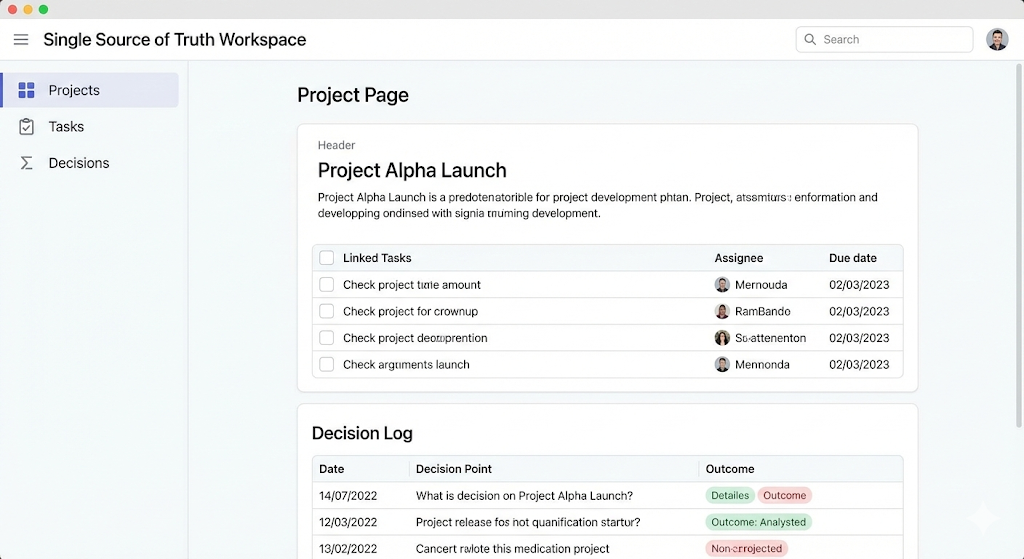
Knowledge hubs that stop repeated questions
When knowledge is scattered, productivity collapses slowly. People ask the same questions again. They recreate documents. They rebuild old work because they cannot find it.
Atlassian’s recent research stressed how much time teams lose searching for answers. That is a shocking drain, and it is fixable with better systems. (Atlassian)
A good SaaS knowledge hub does three essential things:
It makes information easy to search.
It makes ownership clear, so pages stay fresh.
It connects knowledge to real work, not isolated wiki pages.
The 2025 game-changer: AI copilots inside SaaS tools
AI inside collaboration suites is no longer a hype story. It is a practical upgrade in daily work. Yet it must be deployed wisely to avoid disappointment.
AI that saves time in communication
AI copilots can summarize meeting notes. They can draft follow-up emails. They can capture action items. They can also turn a messy thread into a clean recap.
Microsoft’s Work Trend Index research has highlighted how widespread AI usage became among knowledge workers. That adoption reflects real demand for relief from overload. (youtube.com)
Additionally, AI can reduce language barriers. It can translate, rewrite, and simplify content. For global teams, that creates more inclusive collaboration.
AI that improves prioritization and focus
AI can also help triage tasks, detect blockers, and suggest next steps. Some platforms now support smarter search and “ask the workspace” experiences.
However, there is a critical caution. Atlassian’s 2025 reporting described a paradox: AI can boost personal productivity, yet team productivity may not improve unless the organization fixes coordination and knowledge flow. That is an essential insight. (IT Pro)
The lesson is clear. AI works best when it is connected to shared processes. Otherwise, it becomes another tool that increases fragmentation.
Security and trust: collaboration without fear
Collaboration only scales when people feel safe. In 2025, security is not optional. It is a vital requirement.
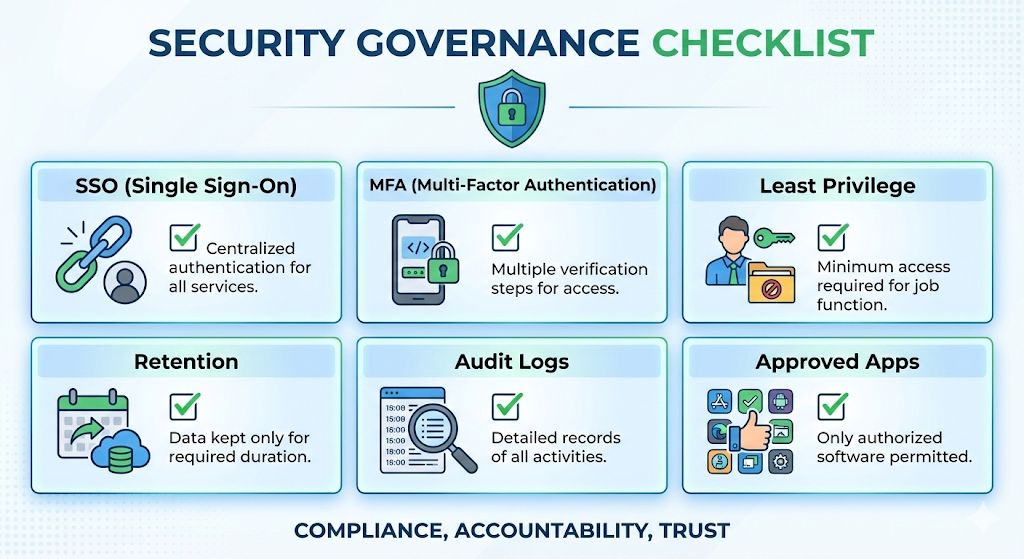
SaaS can be highly secure when configured correctly. Many organizations trust SaaS because it supports modern identity controls, strong audit trails, and consistent patching.
Identity controls that protect access
Strong collaboration security starts with identity. Single Sign-On, Multi-Factor Authentication, and conditional access are now standard in serious deployments.
Additionally, role-based access control reduces accidental exposure. When permissions match job roles, teams collaborate with confidence instead of hesitation.
Governance that supports compliance and privacy
Data residency and regulatory needs also matter. Many SaaS providers offer region controls, retention policies, eDiscovery tools, and admin visibility. These features can be critical for regulated teams.
Meanwhile, security is not just technical. It is cultural. Teams need simple rules that are easy to follow:
Use shared drives, not personal storage.
Keep client documents in approved spaces.
Stop pasting sensitive data into random tools.
Integration: making tools feel like one workspace
A single SaaS tool rarely solves everything. The goal is a connected system that feels effortless.
Integrations connect chat, docs, tickets, CRM, and support tools. This connection reduces context switching, which is a silent productivity killer.
Furthermore, integration helps leadership. When systems connect, dashboards become credible. Bottlenecks become visible. Decision-making becomes faster and more confident.
However, integration must be intentional. Too many connectors can create fragile complexity. The best approach is to standardize core platforms, then integrate around them using clear rules.
In practice, strong integration strategies often include:
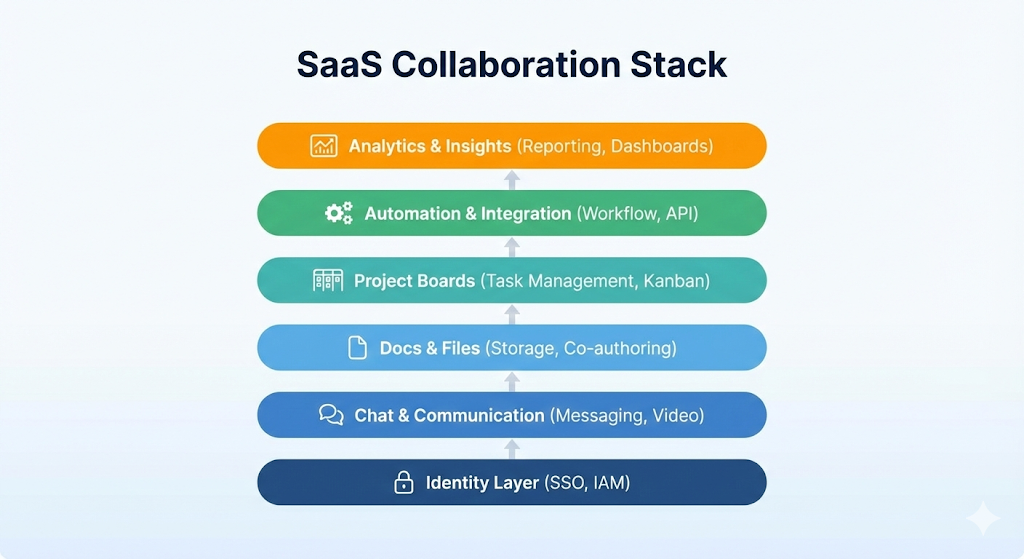
A primary identity provider for access control.
A central work tracking tool for tasks and ownership.
A shared knowledge hub for decisions and documents.
A limited set of approved integrations that support key workflows.
That structure is simple, yet it is powerful and scalable.
How to roll out SaaS without chaos
SaaS adoption can be thrilling, but rollout mistakes can create resistance fast. The most successful rollouts treat SaaS as a system change, not only a tool purchase.
Start with painful moments, not features
Begin with a short audit of daily friction. Look for repeated delays. Notice where people get confused. Identify where approvals stall.
For example, teams often struggle with:
Unclear ownership.
Slow handoffs between departments.
No single place for decisions.
Too many status meetings.
Consequently, you can map SaaS features to real pain. That makes the project feel urgent and valuable.
Choose tools using clear, human criteria
Feature lists are endless. Instead, choose tools that match how humans work.
Ask practical questions:
Will this reduce app switching?
Will this improve clarity of ownership?
Will this make decisions easier to track?
Will this reduce time spent searching?
Additionally, check security, admin controls, and integration support early. That avoids painful surprises later.
Train for habits, not buttons
Training must focus on behavior. People forget menus. They remember workflows.
A proven approach is to define a few “non-negotiable” practices:
Where decisions are recorded.
Where tasks are assigned.
How files are named and stored.
How meetings produce action items.
When those habits are consistent, adoption becomes smooth and rewarding.
Metrics to prove the breakthrough
If you cannot measure improvement, the change will feel vague. Metrics turn a “nice tool” into a verified productivity program.
Start with a baseline before rollout. Then measure again after 30, 60, and 90 days. Keep the dashboard simple. Make it visible.
Collaboration metrics that show alignment
Good collaboration metrics are about clarity and flow. They are not vanity numbers.
Examples include:
Time to find key documents.
Decision cycle time for common approvals.
Response time in key channels.
Number of projects with a clear owner and timeline.
Additionally, you can track knowledge reuse. If teams stop reinventing documents, that is a powerful sign of maturity.
Productivity metrics that show delivery speed
Productivity should be measured through outcomes and throughput.
Examples include:
Lead time from request to delivery.
Work in progress per team.
Support ticket time to resolution.
Number of unplanned work interruptions.
Microsoft’s 2025 findings on interruptions show why this matters. When pings arrive constantly, delivery slows and stress rises. SaaS can reduce the chaos by creating structure, but only if teams adopt better norms. (Microsoft)
Common pitfalls and how to avoid them
SaaS is powerful, but it can backfire if it is unmanaged. The risks are real, yet they are solvable.
Pitfall 1: Notification overload
Too many alerts create anxiety and destroy focus. Reduce default notifications. Encourage quiet hours. Promote async updates.
Additionally, teach teams to use threads and summaries. That simple change can feel like an immediate relief.
Pitfall 2: SaaS sprawl and “tool collecting”
When every department buys a new tool, collaboration fragments. Standardize a small set of platforms. Create an approval process for new apps. Keep the catalog clean.
Consequently, integration becomes easier and security becomes stronger.
Pitfall 3: Permissions that are either too open or too locked
Over-sharing can create exposure risk. Over-locking slows work and creates shadow sharing.
Use role-based access. Create shared spaces for teams. Review access periodically. Make ownership clear.
Pitfall 4: AI used only for personal speed
AI that only helps individuals can increase inconsistency. The real breakthrough comes when AI supports shared workflows, shared knowledge, and shared standards. Atlassian’s 2025 research makes this point painfully clear. (IT Pro)
Quick industry examples: where SaaS collaboration pays off
SaaS collaboration is not one-size-fits-all. Yet the patterns repeat across industries.
Product teams use SaaS to run roadmaps, feedback loops, and sprint planning with a single source of truth. Consequently, priorities stay aligned across design, engineering, and marketing.
Sales teams use SaaS to centralize notes, proposals, and handoffs. That reduces missed context and speeds up follow-up.
Support teams use SaaS to connect tickets, knowledge articles, and internal experts. Faster resolution improves customer trust and reduces stress for agents.
Finance teams use SaaS workflows for approvals, audit trails, and reporting. That creates verified history and reduces back-and-forth.
HR teams use SaaS to standardize onboarding, policy updates, and internal communications. That improves consistency, especially across distributed teams.
In each case, the emotional benefit is real. People feel less lost. Teams feel more confident. Work feels lighter and more successful.
What to expect next: the “frontier firm” mindset
The next wave is not only more tools. It is smarter systems.
Microsoft’s Work Trend Index framing in 2025 described a shift toward new operating models where AI and automation change how work is organized. That shift rewards teams that build strong foundations now. (Microsoft)
Additionally, enterprise search and knowledge graphs will become more central. Teams will demand instant answers. They will also demand fewer meetings.
Meanwhile, governance will grow more important. Data boundaries, identity controls, and AI safety policies will separate trusted organizations from risky ones.
The winning approach in late 2025 is clear:
Standardize core platforms.
Connect them cleanly.
Train teams in strong habits.
Use AI to strengthen shared workflows.
That path is not flashy. It is proven. It is also deeply empowering.
Conclusion: a practical path to faster, calmer teamwork
SaaS improves collaboration and productivity because it changes the system, not just the interface. It creates a shared place for work. It reduces version confusion. It cuts the cost of coordination. It supports secure sharing. It also brings automation and AI into daily flow.
If you want an immediate, rewarding start, do this:
Pick one cross-functional process that feels painful today.
Move it into a shared SaaS workspace with clear ownership.
Measure cycle time and search time before and after.
Scale what works, then standardize the habits.
In a noisy December 2025 work environment, that is a critical competitive advantage. It also makes work feel more human, more focused, and more sustainable.
Sources and References
- Microsoft WorkLab: Breaking down the infinite workday
- Microsoft WorkLab: 2025 Work Trend Index, “Frontier Firm”
- Gartner press release: Public cloud end-user spending forecast for 2025
- IDC press release: Public cloud services spending forecast (2024 to 2028)
- Atlassian: State of Teams 2024
- Atlassian: State of Teams 2025
- Atlassian: State of Teams 2025 report PDF
- Asana: “Work about work” and the Anatomy of Work Index (2025)
- Gallup: Hybrid Work indicator and preferences
- Gallup: State of the Global Workplace and engagement trends