A proven, secure SaaS migration playbook for 2025. Avoid outages, protect data, and move faster with clear steps, risk controls, and smart adoption tactics.
Why SaaS migration feels urgent in December 2025
SaaS migration is no longer a “nice upgrade.” It is a critical survival move for many teams. Buyers expect faster releases. Staff expect modern tools. Regulators expect tighter controls. Meanwhile, attackers exploit weak identity setups and misconfigured cloud services with brutal speed. (Verizon)
Additionally, GenAI features are now embedded inside many SaaS platforms. That creates breakthrough productivity, but it also increases risk if governance is weak. Flexera’s 2025 cloud trends highlight rising pressure from security, sustainability, and GenAI-driven costs. (Flexera)
What “good” looks like
A successful SaaS migration feels calm. It is planned, verified, and controlled. Users keep working. Data stays trustworthy. Security improves, not weakens. Most importantly, you end with a repeatable operating model, not a one-time scramble.
The hidden trap
Many projects fail because teams treat SaaS migration like a simple tool swap. In reality, it is an operating-model shift. Identity changes. Data ownership changes. Support workflows change. If you skip that truth, the rollout becomes painful and expensive.
Step 1: Define outcomes and non-negotiable guardrails
Start with a clear, emotionally honest goal. “Move to SaaS” is not a goal. “Cut onboarding time by 40%” is a goal. “Reduce manual reporting steps” is a goal. “Improve audit readiness” is a goal.
However, goals alone are not enough. You need guardrails that feel strict and protective.
Set measurable outcomes
Choose 3 to 5 outcomes you can prove after launch:
- Faster cycle times for key workflows
- Higher reliability for critical processes
- Stronger access control and visibility
- Lower operational burden for IT
- Better continuity during incidents
Keep the language simple. Make it visible. Make it shared.
Write your “stop rules”
A stop rule is a vital line you will not cross, even under pressure:
- No production cutover without rollback
- No critical data without retention mapping
- No admin accounts without MFA and least privilege
- No integrations without logging and ownership
Consequently, these rules prevent the “just ship it” panic that ruins trust.
Step 2: Build a clean inventory of apps, identities, and data
You cannot migrate what you cannot see. SaaS sprawl is real. Shadow SaaS is common. Overlapping tools hide risk and waste.
Additionally, your inventory is not only apps. It is also accounts, integrations, APIs, and data flows.
Map the portfolio with real ownership
For each system, capture:
- Business owner and technical owner
- Who uses it and why
- What data it stores and where it flows
- Which integrations exist
- Which identities and roles exist
This step feels boring. Yet it is essential. It prevents chaotic surprises later.
Classify data in plain categories
Keep classification usable:
- Public
- Internal
- Confidential
- Restricted
Then attach basic rules for each category. For example, restricted data might require encryption, strict role controls, and limited exports.
Step 3: Choose the right migration approach
SaaS migration is not one pattern. Models include single-tenant, multi-tenant, and phased approaches. Each has tradeoffs in control, complexity, and speed. (TechTarget)
However, you should resist “one giant cutover” unless the system is small and low-risk.
Use the 7 Rs mindset to reduce confusion
Even when the destination is SaaS, you will face choices about each workload. AWS documents the “7 Rs” strategies that help teams decide what to keep, replace, redesign, or retire. (AWS Documentation)
Think like this:
- Retire what is obsolete
- Retain what is stable and not worth changing
- Repurchase where SaaS clearly wins
- Refactor only where it creates real advantage
That approach feels disciplined. It is also proven in complex environments.
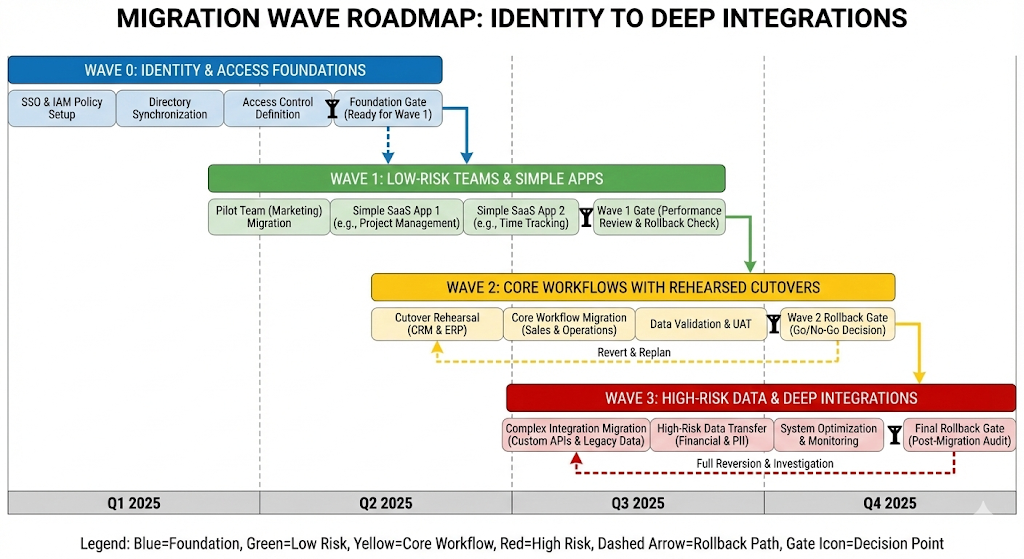
Build migration waves
Create waves based on risk and dependency:
- Wave 0: identity and access foundations
- Wave 1: low-risk teams and simple apps
- Wave 2: core workflows with rehearsed cutovers
- Wave 3: high-risk data and deep integrations
Step 4: Do ruthless vendor due diligence
A SaaS vendor is not just software. It becomes part of your operational reality. That is a big trust decision.
Additionally, contract terms can quietly decide your long-term freedom.
Security and compliance signals that matter
Ask for concrete proof, not marketing:
- Independent security reports and audits
- Clear incident response commitments
- Data residency and processing transparency
- Encryption details and key management options
- Secure SDLC practices and patch timelines
ISO/IEC 27001 is a widely recognized standard for information security management systems, and it is a strong starting point for vendor evaluation. (ISO)
Exit planning is a serious requirement
A powerful migration plan includes a clean exit path:
- Data export formats and frequency
- API rate limits and bulk export options
- Deprovision and deletion guarantees
- Timeline and support for offboarding
This is not paranoia. It is healthy governance.
Step 5: Identity-first migration is the real backbone
Most SaaS pain is identity pain. If identity is weak, everything else becomes fragile.
Meanwhile, passwordless adoption is accelerating. The FIDO Alliance Passkey Index in October 2025 describes industry progress and measurable benefits tied to passkeys. (FIDO Alliance)
Build for Zero Trust, not perimeter trust
Zero Trust principles shift trust away from network location and toward continuous verification of users, devices, and sessions. NIST SP 800-207 is a foundational reference for Zero Trust architecture planning. (NIST Publications)
Practical steps:
- Centralize SSO for all SaaS that supports it
- Enforce MFA for every privileged role
- Use conditional access and device signals
- Apply least privilege with role reviews
Automate identity lifecycle with SCIM
Manual joiners, movers, and leavers create dangerous gaps. SCIM-based provisioning and deprovisioning reduces that risk. It also makes audits calmer.
Additionally, enforce admin separation:
- Separate admin accounts from daily accounts
- Short-lived privilege where possible
- Approval workflows for privileged actions
Step 6: Data migration without drama
Data migration is where trust can be lost in one day. Users will forgive new UI friction. They will not forgive missing invoices, broken histories, or corrupted records.
Consequently, treat data migration as its own project, with rehearsals.
Clean data before you move it
Do not move garbage at high speed. Instead:
- Remove duplicates where safe
- Normalize key identifiers
- Fix inconsistent formats
- Define the “golden record” owner
This work is unglamorous. It is also rewarding, because it prevents future chaos.
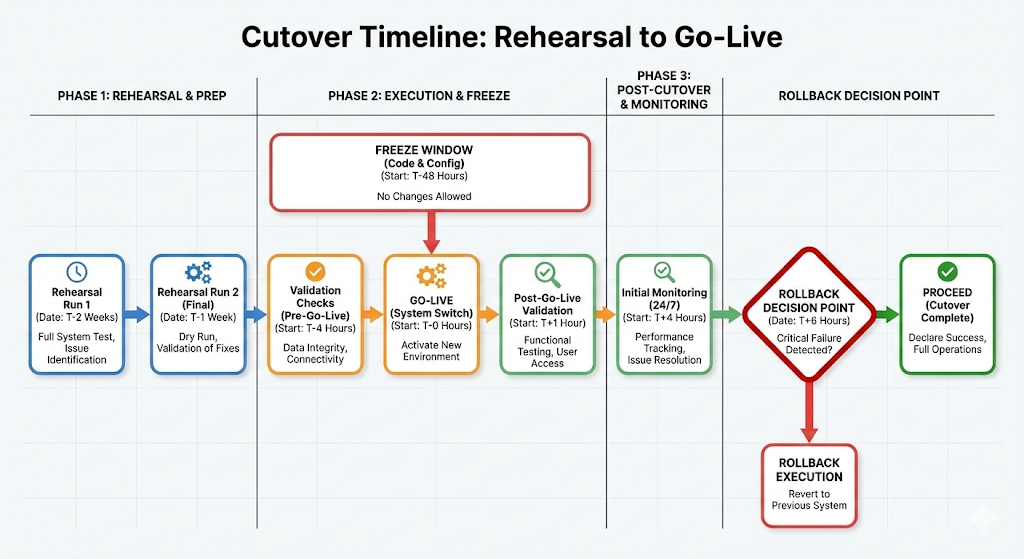
Choose the right cutover pattern
Common patterns include:
- Big bang cutover with strict downtime window
- Phased cutover by team or region
- Dual-write for a limited transition period
- Read-only legacy with final sync
Pick one pattern per system. Document rollback in writing.
Validate like an analyst, not a hopeful optimist
Validation must be blunt:
- Row counts and reconciliation totals
- Sampling of high-value records
- Permissions tests by role
- Integration event checks
- Performance checks under load
Step 7: Integrations, APIs, and workflow continuity
SaaS rarely lives alone. Integrations are where silent failures grow.
Additionally, GenAI copilots and agentic workflows often rely on APIs and connectors. That increases value, but also expands the attack surface.
Treat integrations as products
For each integration, define:
- Owner
- Expected inputs and outputs
- Error handling
- Monitoring and alerting
- Change process
Then build tests. Do not rely on “it worked once.”
Use iPaaS carefully
iPaaS can speed up delivery. It can also create hidden complexity. Keep it safe:
- Limit who can build production flows
- Enforce versioning and approvals
- Log every data movement
- Apply DLP rules where possible
Step 8: Security hardening for SaaS in 2025
SaaS security is not only about vendor security. It is also about your configuration, your identities, and your monitoring.
Meanwhile, breach patterns continue to reward credential theft and human error. Verizon’s 2025 DBIR materials highlight how common credential-driven and web-application attack patterns remain. (Verizon)
Establish a configuration baseline
Create a secure baseline for each SaaS platform:
- MFA and conditional access enabled
- Admin roles minimized and reviewed
- External sharing rules defined
- Token lifetimes controlled
- Audit logs enabled and retained
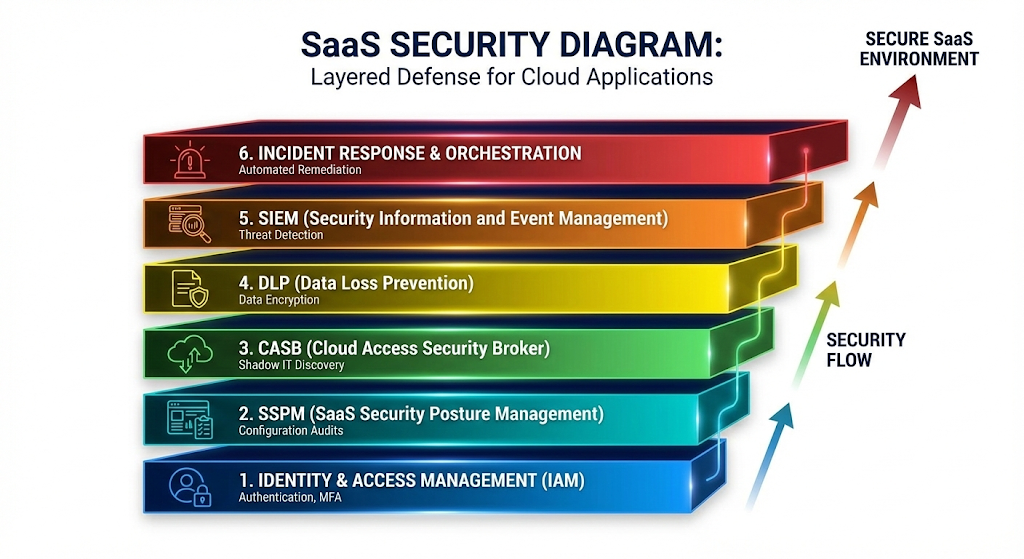
Then check drift regularly. This is where SSPM tools can help.
Layer controls: CASB, DLP, and modern monitoring
Use controls that match your risk:
- CASB for visibility and policy enforcement
- DLP for sensitive data movement
- Centralized logging into your SIEM
- Alerts for impossible travel and risky sign-ins
Additionally, align controls to recognized frameworks. NIST SP 800-53 provides a broad catalog of security and privacy controls, which helps when you need structured coverage. (NIST Computer Security Resource Center)
Step 9: Governance and FinOps discipline
SaaS migrations can feel thrilling at first. Then sprawl appears. Licenses multiply. Shadow tools pop up again.
However, governance can be lightweight and still effective.
Create a SaaS governance rhythm
A simple monthly cadence works:
- Review new SaaS requests
- Review admin changes and risky settings
- Review inactive users and unused licenses
- Review top integrations and failures
Additionally, Microsoft’s Cloud Adoption Framework emphasizes structured planning, governance, and ongoing management as part of modern cloud adoption. (Microsoft Learn)
Track usage and value without creating fear
Keep metrics positive and transparent:
- Active users vs assigned users
- Top workflows used
- Support tickets by category
- Time saved in key processes
This builds a thriving culture instead of a policing culture.
Step 10: Change management that actually works
If users hate the change, they will route around it. They will store data in unsafe places. They will create fragile workarounds.
Consequently, adoption is a security control, not just a training concern.
Build champions and a hypercare window
Pick champions per team. Give them early access. Let them influence templates and workflows.
Then plan hypercare:
- Extra support coverage for 2 to 4 weeks
- A visible issue tracker
- Daily triage for the first week
- Fast fixes for top friction points
Train by job-to-be-done, not by features
People do not want feature tours. They want outcomes:
- “How to approve requests faster”
- “How to find the right document quickly”
- “How to share safely with partners”
Make it practical. Make it short. Make it repeatable.
Step 11: Measure success and continuously improve
Your first launch is not the end. It is the starting line.
Additionally, SaaS platforms update constantly. Your controls and training must keep pace.
Use a post-migration scorecard
Keep it simple:
- Reliability: incidents and uptime impacts
- Security: risky sign-ins, admin changes, policy drift
- Productivity: cycle time improvements in key workflows
- Data quality: error rates and reconciliation results
- Satisfaction: quick pulse surveys
Celebrate wins publicly. Fix pain quickly. That is how you protect trust.
Run a 90-day audit
A 90-day check is vital because reality changes after launch:
- Roles creep upward
- Sharing expands
- New integrations appear
- Users invent shortcuts
Treat the audit as supportive. The goal is stability and confidence.
The most common failure patterns to avoid
These failure patterns are painfully common:
Rushing identity
If SSO, MFA, and lifecycle automation are weak, everything becomes fragile. Fix identity first. That is a proven safety move. (NIST Publications)
Migrating data once, without rehearsals
Teams often skip rehearsals to “save time.” That decision usually causes a bigger delay later. Rehearse. Validate. Then cut over.
Ignoring exit planning
Without an exit plan, you lose negotiating power and operational freedom. Protect your future self with an authentic offboarding path.
Treating adoption as optional
Users are not obstacles. They are the system. If adoption fails, your migration fails.
Conclusion: a confident, future-ready SaaS migration
A great SaaS migration is not luck. It is disciplined planning, verified execution, and human-centered change.
Furthermore, December 2025 is a moment of both breakthrough capability and heightened risk. GenAI features, faster integrations, and passwordless sign-in can be massively rewarding. Yet only if you stay strict on identity, data validation, and continuous governance. (Flexera)
If you follow the steps here, you will move with speed and control. You will protect trust. And you will build a resilient operating model that keeps paying off.
Sources and References
- Flexera 2025 State of the Cloud Report trends
- Verizon 2025 Data Breach Investigations Report hub
- Verizon 2025 DBIR SMB snapshot PDF
- NIST SP 800-207 Zero Trust Architecture PDF
- AWS Prescriptive Guidance: 7 migration strategies
- Microsoft Cloud Adoption Framework overview
- FIDO Passkey Index October 2025 PDF
- ISO overview: ISO/IEC 27001 information security management
- Cloud Security Alliance Cloud Controls Matrix overview
- TechTarget: SaaS migration models and best practices