Discover essential AI tools that boost productivity, cut costs, and sharpen decisions. Updated for December 2025 with practical picks for every team.
Why this list matters in December 2025
AI is no longer a side experiment. It is a critical operating layer. In 2024 and 2025, teams moved from curiosity to real deployment. The shift feels urgent because competitors are speeding up. Customers also expect faster replies, clearer answers, and smoother service. That pressure is immediate, yet the upside can be profitable and rewarding.
Furthermore, the tools themselves changed. Modern assistants can read files, draft plans, summarize meetings, generate images, and automate steps across apps. For many leaders, this feels like a breakthrough moment that is both critical and exciting. They can also work with your company knowledge through retrieval and permissions. That mix is a breakthrough for everyday work.
However, the stakes rose too. Leaders now worry about privacy, compliance, hallucinations, and vendor lock in. Smart companies treat AI tool choice like a security and procurement decision, not a toy.
What changed in 2024 to 2025
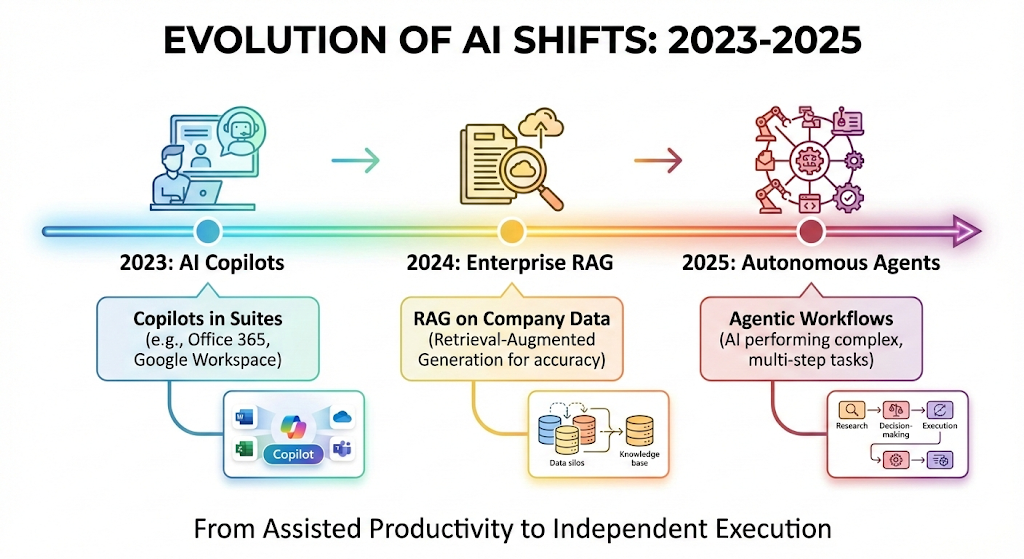
First, adoption spread across functions, not just marketing. Second, “copilots” became embedded in the software people already use. Third, agentic workflows started to appear, where the system can plan and execute steps.
Additionally, the business mood shifted from hype to value. Many pilots still fail. Yet the winning teams are getting visible wins. They are cutting cycle time and reducing busywork. They are also raising quality through consistent drafts, checklists, and summaries. The best outcomes are proven, verified, and deeply rewarding.
How to choose an AI tool that actually delivers
Picking “the best AI” is not the goal. Picking the most profitable workflow is the goal. So the right tool depends on your stack, your data, and your risk level. The most successful choices are proven, verified, and easy to govern.
Consequently, this guide focuses on tools that are widely used, commercially mature, and practical for business teams. Each tool section includes what it is, where it shines, and a safe way to pilot it.
The four filters that separate winners from expensive pilots
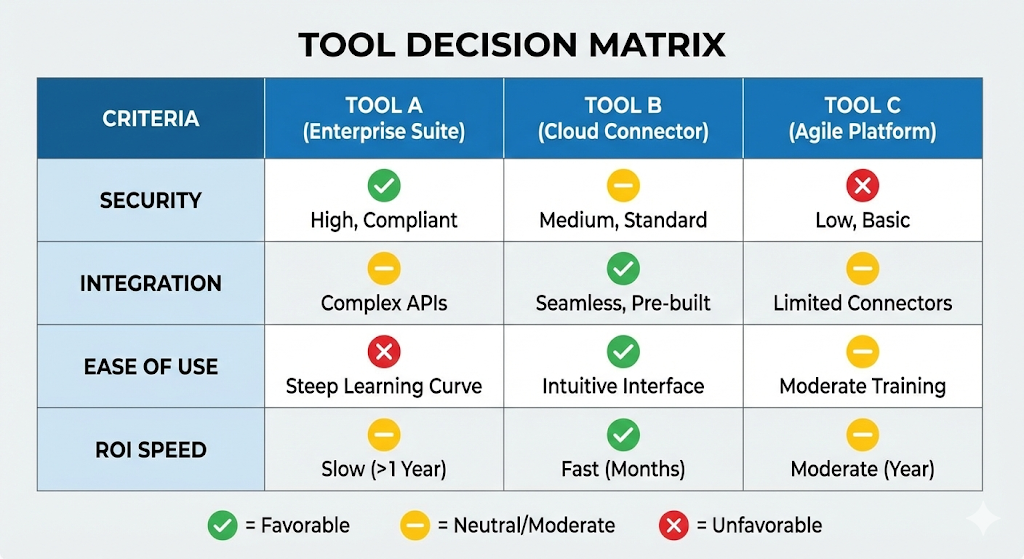
Start with the workflow. Ask which task is painful, frequent, and measurable. Next, check data access. Decide whether the tool can use your docs, CRM, tickets, or messages safely. Then, verify controls. Look for admin features, audit logs, and policy settings. Finally, confirm integration. A tool that sits outside your daily apps gets ignored.
Moreover, cost is not only license price. Hidden cost includes training time, prompt chaos, and rework. A verified rollout plan beats a flashy demo. No tool is guaranteed, yet a proven plan beats hope.
Ground answers with RAG and permissions
Many business tasks fail because the model guesses. Retrieval augmented generation, often called RAG, reduces that risk. It lets the assistant pull facts from approved company sources before it writes.
Additionally, permissions matter as much as retrieval. A trusted setup respects who can see what. This is vital for HR, finance, and legal work. It also keeps sensitive documents secure.
Moreover, RAG makes pilots easier to measure. If answers cite your own docs, quality feels verified. That credibility builds confident adoption.
1) ChatGPT for Work
ChatGPT is a versatile assistant used for writing, analysis, research, and rapid drafting. In many teams, it becomes the default “thinking partner” for daily work. That is powerful because it reduces friction. You can start with one prompt and iterate fast. For many teams, the lift feels immediate. With clear guardrails, it becomes a proven, powerful, trusted assistant.
Additionally, ChatGPT is strong for cross functional tasks. ChatGPT can help sales refine outreach, help finance outline scenarios, and help operations write SOPs. For developers and analysts, it becomes a fast helper when you give clear context.
Where it delivers the most rewarding value
ChatGPT shines in “blank page” work. Most importantly, it turns rough notes into clean emails, proposals, and policies. That is a huge relief for busy teams.
Furthermore, it is excellent for structured reasoning, if you provide constraints. You can ask for risk registers, implementation plans, and decision memos. The output becomes more reliable when you request sources, assumptions, and checks.
A safe pilot in two weeks
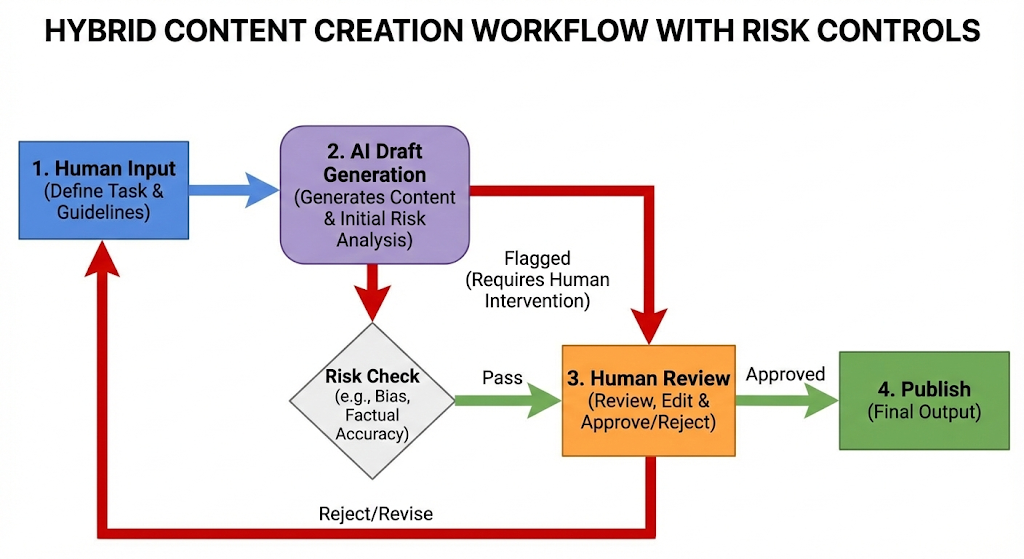
Pick one department and one workflow. For example, customer success can use it to draft replies and create knowledge base updates. Add a simple rule: every draft must be reviewed by a human. Track time saved and quality signals. That creates trust without risky automation. It also keeps the work authentic and verified.
2) Microsoft 365 Copilot
Microsoft 365 Copilot is built into tools many companies already live in: Word, Excel, PowerPoint, Outlook, and Teams. That makes it immediately practical. It can turn meetings into summaries, turn documents into drafts, and turn spreadsheets into insights. For busy staff, this is a vital upgrade. In strong rollouts, it becomes a trusted and verified default.
Meanwhile, Copilot’s value often comes from context. When it can reference the files and chats you already have access to, it feels personal and precise. That is a proven path to adoption.
Where it feels like a breakthrough
Copilot is especially strong for office work. Copilot can draft a report from a set of notes. Next, it can create a PowerPoint from an outline. In Excel, it can also help build formulas and explanations. For many teams, that is a critical productivity lift.
Additionally, Copilot reduces “meeting drag.” It can recap decisions and list next steps. That helps managers move fast without losing details.
Watch this before you roll it out
A secure rollout pattern
Start with a permissions cleanup. If your SharePoint and Teams access is messy, Copilot will surface messy content. This step is critical, vital, and proven. Next, define prompt templates for common tasks. Then run a 30 day pilot with power users. Measure writing time, meeting follow up speed, and document quality.
3) Gemini for Google Workspace
Gemini for Google Workspace brings AI into Gmail, Docs, Sheets, Meet, and more. It is designed for fast drafting, quick summaries, and help inside everyday work. For many teams, the benefit is immediate and essential. For Google centric companies, it becomes a vital productivity layer.
However, the real advantage is speed inside the workflow. People do not need to switch apps. They can draft an email while reading a thread. They can summarize a doc while editing it.
Where it is most effective
Gemini is strong for communications and planning. It can draft email replies, build meeting notes, and help create structured docs. It also supports spreadsheet help, which matters for teams that run on Sheets. For many operations teams, that is a profitable and essential boost.
Additionally, Gemini helps teams standardize tone and clarity. That is essential for customer facing writing. It can reduce back and forth edits.
Watch this for practical use cases
A fast pilot that feels safe
Choose one content stream, such as weekly client updates. Draft them with Gemini. Then compare time and client feedback. Keep sensitive data out at first. Expand only after you set clear rules for what can be pasted.
4) Claude for Work
Claude is a business focused AI assistant known for thoughtful writing and strong long context handling. Many teams use it for policy drafts, deep analysis, and careful synthesis. It can feel calm and reliable, which builds confidence. That trusted tone is valuable in critical documents.
Furthermore, Claude is often used for large document work. That includes contracts, manuals, and long briefs. If your work involves heavy reading, this is a proven option. In practice, it can feel like a quiet, revolutionary upgrade.
Where it shines
Claude is excellent for “document heavy” roles. Legal and compliance teams use it for first pass summaries. Strategy teams use it to compare options. Support leaders use it to rewrite and standardize articles.
Additionally, Claude can help with structured outputs like tables, checklists, and step by step procedures. That is valuable when you need consistent operations.
How to pilot without chaos
Create a shared prompt library for your company style. Add a short “facts only” rule for summaries. Ask for citations back to the provided text. Then run a review loop where humans approve outputs. This builds trust and avoids embarrassing errors.
5) Salesforce Einstein and Agentforce Assistant
Salesforce’s Einstein capabilities embed AI in CRM workflows. That matters because customer data is where growth lives. When done well, the results are profitable and measurable. When AI is inside that system, it can support sales, service, and marketing in a direct way.
Consequently, the best CRM AI is not a generic chatbot. It is a tool that understands objects, fields, and permissions. That is what makes Einstein valuable. In the best cases, it enables a successful, thriving sales rhythm.
Where it drives profitable results
Einstein can help reps prepare for calls, summarize accounts, and draft follow ups. It can also assist service agents by suggesting replies and surfacing relevant knowledge. For many organizations, that reduces handle time and raises quality.
Additionally, AI can help with pipeline hygiene. It can summarize deals and highlight risks. That improves forecast discipline.
Watch this CRM focused demo
A safe way to start
Begin with read only use cases. Use AI for summaries and drafts. Avoid auto updates to records at first. Then introduce controlled actions, like creating a task or drafting an email. Keep an audit trail.
6) HubSpot Breeze
HubSpot’s Breeze brings AI into marketing, sales, and service workflows. It is designed for small and mid sized teams that want fast wins. The promise is simple: immediate help, with a proven path to thriving execution. When used well, it feels like a supportive teammate that knows your CRM context.
Meanwhile, Breeze can help unify teams. It can support marketing copy, sales prep, and service replies in one platform. That reduces tool sprawl. The experience can feel exclusive, yet still practical.
Where it saves immediate time
Breeze is strong for content and CRM tasks. It can draft emails, generate landing page copy, and summarize records. It can also help teams prep for meetings with account context.
Additionally, Breeze is helpful for consistent outreach. It can generate variants and keep tone aligned. That is essential when you scale.
A practical rollout for growth teams
Pick one motion, such as lead follow up. Define a template for first email and second email. Use Breeze to draft, then human review. Track response rate and time per lead. Expand only if quality stays high.
7) Atlassian Intelligence
Atlassian Intelligence brings AI to Jira, Confluence, and related tools. If your business builds software, runs projects, or manages IT tickets, this is a critical layer. For many teams, the improvement feels like a breakthrough in clarity. It can turn tickets into summaries and turn notes into clear pages.
However, the real win is context. Jira and Confluence already contain your work history. AI can help you navigate it without endless searching.
Where it improves execution
Atlassian Intelligence helps with drafting and summarizing. It can help you write user stories. It can also summarize incidents and create postmortem outlines. That speeds up learning and reduces fatigue.
Additionally, it supports knowledge work in Confluence. It can clean up long pages. It can produce clear updates. That improves alignment.
A safe pilot for engineering and IT
Start with non sensitive projects. Use AI to summarize weekly status. Then add a rule: summaries must link back to source tickets. Train users to verify. This keeps trust high. Over time, it supports a successful, thriving delivery culture.
8) Notion AI
Notion AI blends writing help, search, and knowledge work in one workspace. It is popular because it reduces tool switching. That reduction feels surprisingly rewarding during busy weeks. Teams can write docs, store knowledge, and ask questions in one place. For many teams, that simplicity is vital and rewarding.
Furthermore, Notion AI is useful for turning messy notes into structured plans. That is a verified benefit for startups and fast moving teams.
Where it feels genuinely helpful
Notion AI shines in documentation. Notion AI can turn meeting notes into action items. It can also generate project briefs. Across the workspace, it can answer questions in seconds.
Additionally, it supports research modes that collect and synthesize material. That is a powerful feature when you are planning products or policies.
A clean adoption approach
Move one team playbook into Notion. Then train the team to use AI for summaries and drafts. Create a style guide page. Keep a simple approval flow for anything customer facing.
9) Adobe Firefly
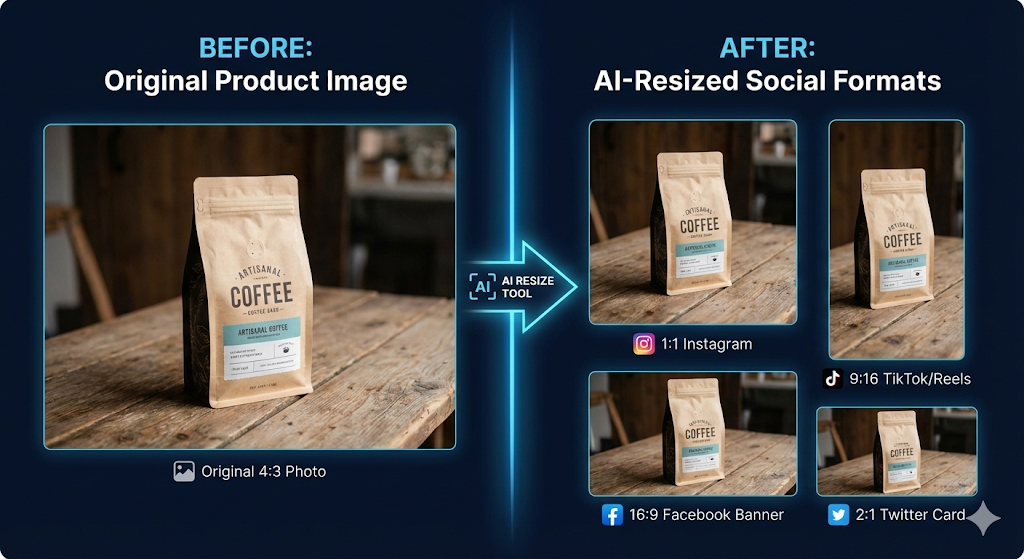
Adobe Firefly is a generative creative tool for images, designs, and content production. It matters because marketing and product teams now need visual assets at high speed. For many brands, that speed is essential and commercially critical. Firefly can help create variants, resize assets, and generate concepts quickly.
Additionally, Firefly is valuable because it fits existing creative workflows. For Adobe heavy teams, it becomes an immediate productivity boost. Used with brand rules, it can be certified safe for everyday concept work.
Where it creates exciting impact
Firefly supports rapid concepting. It can generate product mockups, social graphics, and visual backgrounds. It can also help teams adapt assets across channels. That is critical for modern marketing.
Furthermore, it can reduce creative bottlenecks. Designers still lead. Yet the first draft comes faster. That keeps campaigns on schedule.
A safe and trusted rollout
Define brand rules first. Create approved prompts and style references. Keep final approval with design leads. Use Firefly for drafts and variants, not final truth. That keeps quality authentic.
10) Zapier Agents
Zapier Agents extends automation with AI. Instead of only “if this then that,” you can give an agent a goal and connect it to tools. For many companies, this is the most profitable layer, because it removes manual handoffs. The effect can be immediate, verified, and deeply rewarding.
Consequently, Zapier Agents can be a bridge between apps. It can move tasks across CRM, email, docs, and support tools. That is vital when your stack is fragmented. When the approvals are tight, results can feel almost guaranteed.
Where it delivers the fastest ROI
Zapier Agents helps with repetitive operations. Zapier Agents can create tickets from emails. They can route leads to the right owner. They can also compile a daily brief from multiple sources. That saves hours every week.
Additionally, it supports scale without hiring. That is a rewarding outcome when you grow fast.
A safe way to automate with confidence
Start with low risk actions, like creating drafts, not sending messages. Add human approval for any external output. Log each action. Then expand to higher impact steps once the workflow is stable.
Implementation playbook: make AI tools successful, not chaotic
Buying licenses is easy. Changing habits is harder. So you need a clear rollout plan. Without it, you get scattered prompts, mixed quality, and frustrated teams. With it, you get a calm, confident, and reliable system.
Meanwhile, the most successful rollouts treat AI like a product launch. They define users, use cases, policies, and metrics. They also invest in training. This investment is critical for a secure and reliable rollout.
Step one: pick measurable workflows
Choose workflows with clear time cost and quality signals. Examples include meeting summaries, customer replies, report drafts, and ticket triage. Avoid vague goals like “use AI more.”
Additionally, define a baseline. Measure time per task before AI. Then measure after. That is how you build a verified business case.
Step two: set guardrails that feel fair
Write a short policy in plain language. Define what data is allowed and what is not. If you operate in regulated regions, align the policy with laws like the EU AI Act and sector rules. Clarify that humans remain accountable. Create a simple escalation path if outputs look wrong.
Furthermore, set quality rules. Require a check for dates, names, and numbers. Require citations for claims. This reduces errors fast.
Step three: train prompt skills, not prompt tricks
Teach people how to give context, constraints, and examples. Teach them to ask for drafts, then refine. Teach them to request a checklist and an output format. That creates consistent quality.
Also teach verification. Encourage people to ask, “What did you assume?” That question is simple and powerful.
2024 to 2025 snapshot: trends leaders cannot ignore
The numbers in recent research show a clear pattern. AI use is widespread, yet value capture is uneven. That tension is critical, and it keeps leaders urgent.
Additionally, the market signal is clear in December 2025. Companies want practical copilots today. They also want agentic AI tomorrow. The gap is governance.
Adoption is high, but scaling is the hard part
McKinsey reports that 88% of respondents said their organizations use AI regularly in at least one business function in 2025, up from 78% the prior year. That is a remarkable jump in a short time.
Meanwhile, McKinsey’s global survey also notes that 71% report regular use of generative AI, with AI use spanning many functions. This is no longer niche. It is mainstream.
Agents are emerging, but most teams are still learning
McKinsey also reports that 39% of respondents say their organizations are experimenting with agentic AI. Another 23% say their organizations are already developing or scaling agentic AI systems.
However, the same source warns that no function reports more than 10% scaling. In other words, the ambition is real, but execution is still early.
Investment is rising, and tools are multiplying fast
Stanford’s 2025 AI Index reports corporate AI investment at $252.3 billion in 2024. It also reports $33.9 billion in private investment for generative AI in 2024. This funding wave supports a growing menu of tools for business teams.
Consequently, procurement is harder. Choice overload is real. A proven shortlist matters.
Hype is costly, so risk checks must be ruthless
Gartner predicts that over 40% of agentic AI projects will be canceled by the end of 2027 because of rising costs, unclear value, and weak risk control. Gartner also predicts that by 2028, at least 15% of day to day work decisions will be made autonomously through agentic AI.
Therefore, the safest path is staged progress. Start with assistance. Move to supervised actions. Only then consider autonomy.
Common mistakes that quietly kill ROI
AI failures are rarely dramatic. They are usually slow and silent. The most common mistake is unclear ownership. Another mistake is poor data hygiene. A third mistake is treating AI output as truth.
However, these failures are fixable. Simple rules can prevent most problems. Training reduces mistakes even faster. Strong access control closes the remaining gaps.
The simple fixes that work
Assign a tool owner per department. Create a shared prompt library. Add a review step for external communications. Clean up permissions and naming in your docs. Finally, measure one metric per workflow.
Consequently, success becomes repeatable. You stop guessing. You start improving.
What to do next this week
Start with one tool that matches your stack. Then choose one workflow that is painful and frequent. Run a small pilot with clear rules. Capture time saved. Capture quality. Share wins fast. Those early wins feel exciting and build trusted momentum.
Additionally, plan for governance from day one. A short policy and basic training protect your brand. They also protect your people.
Finally, remember the goal. AI is not magic. It is a practical force multiplier. Used well, it feels empowering, profitable, and surprisingly human. That kind of authentic advantage is hard to ignore.
Sources and References
- McKinsey: The State of AI (2025) (McKinsey & Company)
- McKinsey: AI at work but not at scale (Mar 2025) (McKinsey & Company)
- Stanford HAI: 2025 AI Index Report, Economy (Stanford HAI)
- Gartner: Over 40% of agentic AI projects canceled by 2027 (Gartner)
- OpenAI: Introducing ChatGPT Enterprise
- Microsoft Learn: Microsoft 365 Copilot overview
- Google Workspace: Gemini for Google Workspace resources hub (OpenAI)
- Anthropic: Claude for Work
- Salesforce: About Einstein Copilot (adobe.com)
- HubSpot: Breeze AI (HubSpot)
- Atlassian Support: Atlassian Intelligence overview (notion.com)
- Notion: Notion AI (Zapier)
- Adobe: Adobe Firefly (adobe.com)
- Zapier: Zapier Agents (atlassian.com)